Pixer: The Fastest Image Library for Dart & Flutter

The Dart ecosystem lacked a performant image library for ages. We've been mostly having an image, a feature-rich package written in Dart, but it's a bit slow. So, a few months ago, I decided to fix that with FFI & Rust and created Pixer. It turned out to be a good idea — Pixer is, on average, 24 times(!!!) faster than image for operations such as resizing, encoding/decoding, flipping, and more.
- Pixer Features
- Benchmarks
- How Pixer Works
- Roadmap
Pixer Features
Pixer currently supports standard operations, such as encoding/decoding, resizing, flipping, blurring, inverting, and others. The following example loads an image, resizes it to 4K, encodes it to PNG, and saves it to a file:
void main() async {
  final img = Pixer.fromFile('assets/example_img.jpg');

  // Upscale the image to 3840x2160
  final resizedImage = img.resizeExact(3840, 2160);

  // Encode the image to PNG
  final pngBytes = resizedImage.encode(PixerPngEncoder());
  File('example_img.png').writeAsBytesSync(pngBytes);

  // Dispose the images to release memory
  img.dispose();
  resizedImage.dispose();
}
Pixer is immutable - every operation returns a new image. Images might or might not be disposed automatically. Thus, it is more reliable to dispose them explicitly. To see all Pixer APIs, visit the Pixer documentation.
Available for Dart & Flutter
With the help of Build Hooks, Pixer is available for both Dart and Flutter. All Flutter platforms are supported, except for Web. Web support is planned, but needs exploration with WASM.
Incredible Speed
Since Pixer's core is written in Rust, it is also fast and optimized. Here is a comparison with the image package for the same operations as in the code snippet above:
See more performance comparisons in the next Benchmarks section.
Benchmarks
I have written 6 benchmarks for different operations for both pixer and image using benchmark_harness. You can find their code here.
For example, these are the benchmarks for resize:
/// Benchmark for resizing images using the pixer package
class PixerResizeBenchmark extends BenchmarkBase {
  PixerResizeBenchmark(this.targetWidth, this.targetHeight)
    : super('pixer.resize_${targetWidth}x$targetHeight');

  final int targetWidth;
  final int targetHeight;
  late Pixer image;

  @override
  void setup() {
    super.setup();
    image = Pixer.fromFile('assets/example_img.jpg');
  }

  @override
  void teardown() {
    super.teardown();
    image.dispose();
  }

  @override
  void run() {
    final resized = image.resize(targetWidth, targetHeight, filter: FilterTypeEnum.Lanczos3);
    resized.dispose();
  }
}

/// Benchmark for resizing images using the dart image package
class DartImageResizeBenchmark extends BenchmarkBase {
  DartImageResizeBenchmark(this.targetWidth, this.targetHeight)
    : super('dart_image.resize_${targetWidth}x$targetHeight');

  final int targetWidth;
  final int targetHeight;
  late Image image;

  @override
  void setup() {
    super.setup();
    image = decodeImage(File('assets/example_img.jpg').readAsBytesSync())!;
  }

  @override
  void run() {
    copyResize(image, width: targetWidth, height: targetHeight, interpolation: Interpolation.cubic);
  }
}
Across all the operations, Pixer shows a high performance boost. I've asked AI to summarize this with a nice image, here are the results:
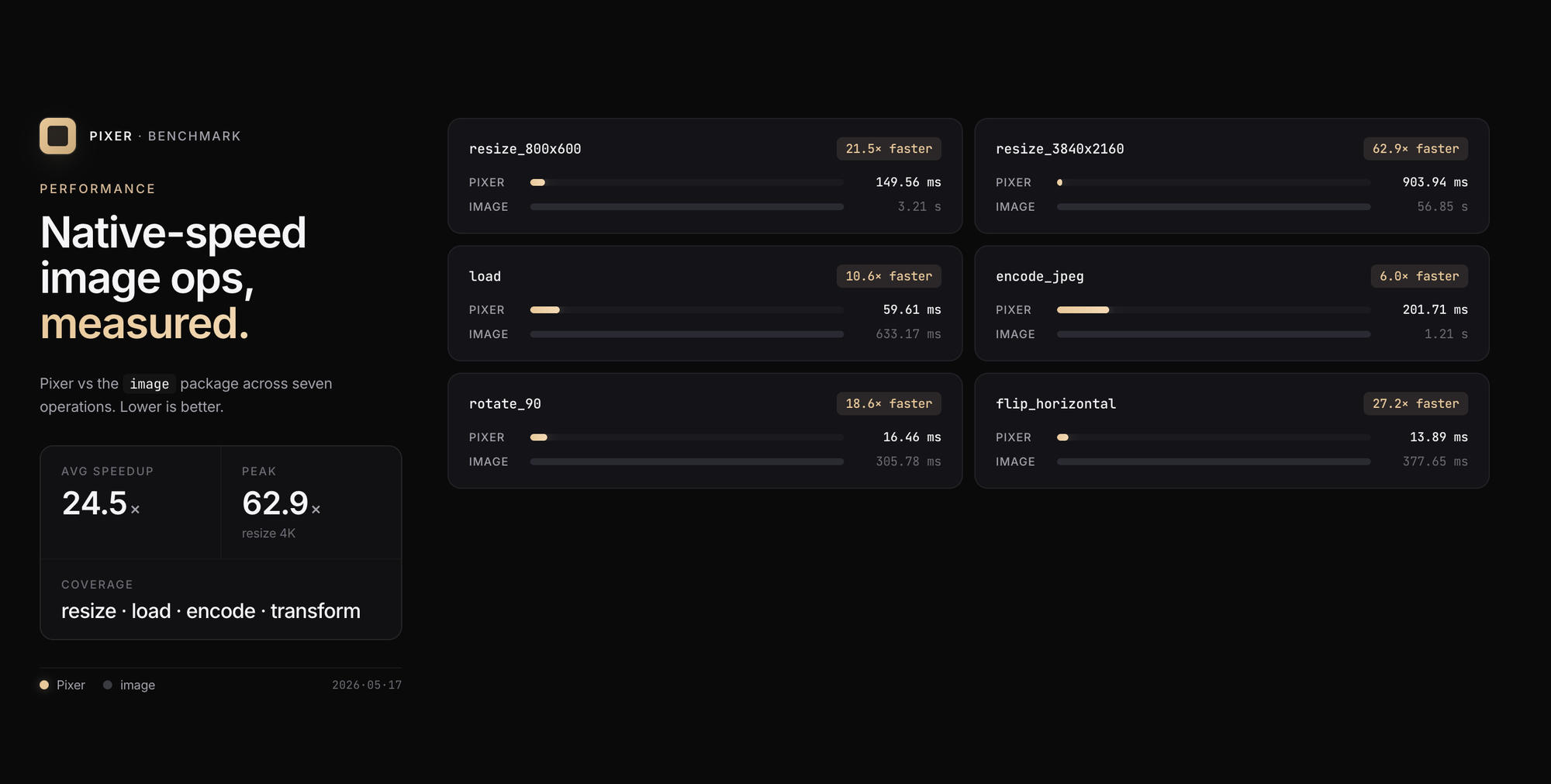
On average, Pixer completes an operation 24x faster than image. For resize from Full-Hd to 4K, Pixer was 62X faster.
How Pixer Works
In this section, I will provide a brief overview of the Pixer library's internal structure.
The Rust Side
At its core, Pixer uses Rust image crate. This is a popular and feature-rich library with more than 125M all-time downloads.
Why choose Rust? It is a fast, type-safe, no-runtime language that lends itself well to FFI. It also has a great, performance-focused community. Using Rust via FFI is seamless.
The great thing about Rust is that, in most cases, you don't need to create complex wrappers around the code. You simply write the Rust code and use cbindgen to generate C headers and expose the code as a C API. These headers are then used by ffigen to generate the Dart bindings.
I have a script generate_bindings.sh for this:
SCRIPT_DIR="$(cd "$(dirname "${BASH_SOURCE[0]}")" && pwd)"
PACKAGE_DIR="$(cd "$SCRIPT_DIR/.." && pwd)"
PROJECT_ROOT="$(cd "$PACKAGE_DIR/../.." && pwd)"
NATIVE_DIR="$PROJECT_ROOT/native"
HEADER_FILE="$PACKAGE_DIR/native/include/pixer.h"

echo "Generating C header from Rust code..."

# Run cbindgen from the native directory
cd "$NATIVE_DIR"
cbindgen --config cbindgen.toml --crate pixer --output "$HEADER_FILE"

echo "Header generated: $HEADER_FILE"

echo "Generating Dart FFI bindings..."

# Run ffigen via the Dart API from the package directory
cd "$PACKAGE_DIR"
dart run tool/generate_bindings.dart
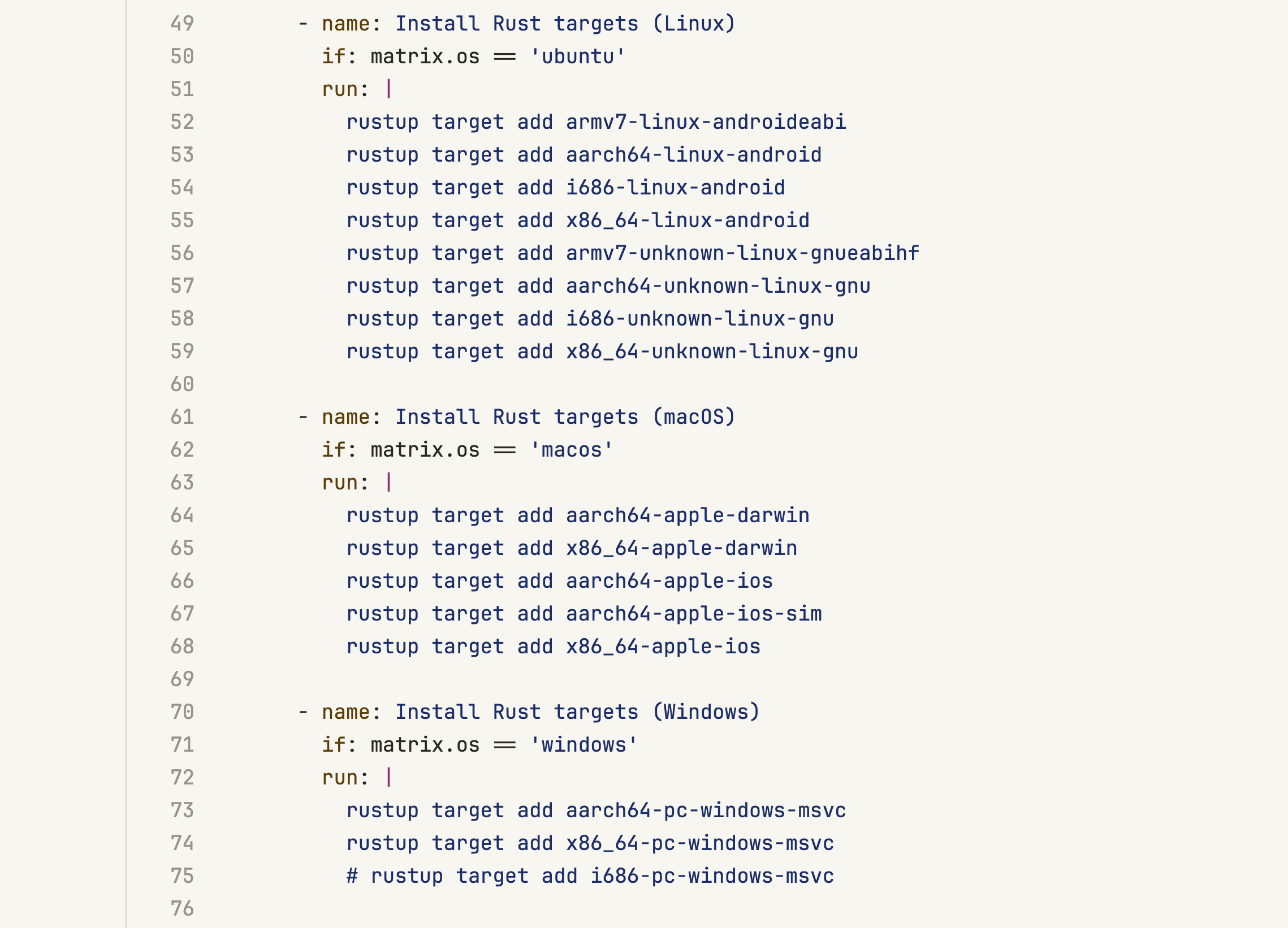
Another great feature of Rust is cross-compilation. I have a Github Action that starts Linux, Mac and Windows machines and compiles native binaries for different architectures:
The Dart Side
Now, we need to generate the Dart bindings from the C header file. This is done via ffigen. I have a Dart script that accomplishes this task:
void main() {
  final packageDir = File.fromUri(Platform.script).absolute.parent.parent.uri;
  final header = packageDir.resolve('native/include/pixer.h');
  final output = packageDir.resolve('lib/src/bindings/bindings.dart');

  final generator = FfiGenerator(
    headers: Headers(
      entryPoints: [header],
      include: (candidate) => _sameFile(candidate, header),
      compilerOptions: _macOSCompilerOptions(),
    ),
    output: Output(
      dartFile: output,
      preamble: '''
// ignore_for_file: always_specify_types
// ignore_for_file: camel_case_types
// ignore_for_file: non_constant_identifier_names
''',
      commentType: const CommentType(CommentStyle.any, CommentLength.full),
      style: const NativeExternalBindings(),
    ),
    functions: Functions(
      include: Declarations.includeAll,
      isLeaf: (declaration) => _leafSymbols.contains(declaration.originalName),
    ),
    structs: const Structs(
      include: Declarations.includeAll,
      dependencies: CompoundDependencies.full,
    ),
    enums: const Enums(include: Declarations.includeAll),
    unions: const Unions(include: Declarations.includeAll, dependencies: CompoundDependencies.full),
    unnamedEnums: const UnnamedEnums(include: Declarations.includeAll),
    globals: const Globals(include: Declarations.includeAll),
    macros: const Macros(include: Declarations.includeAll),
    typedefs: const Typedefs(include: Declarations.includeAll),
  );

  generator.generate();
}
The result is type-safe bindings that can be consumed seamlessly:
/// Free an image handle
@ffi.Native<ffi.Void Function(ffi.Pointer<ImageHandle>)>(isLeaf: true)
external void pixer_free(ffi.Pointer<ImageHandle> handle);

/// Load an image from a file path
/// Returns null on error
@ffi.Native<ffi.Pointer<ImageHandle> Function(ffi.Pointer<ffi.Char>)>()
external ffi.Pointer<ImageHandle> pixer_load(ffi.Pointer<ffi.Char> path);

/// Load an image from memory buffer
@ffi.Native<ffi.Pointer<ImageHandle> Function(ffi.Pointer<ffi.Uint8>, ffi.UintPtr)>()
external ffi.Pointer<ImageHandle> pixer_load_from_memory(ffi.Pointer<ffi.Uint8> data, int len);

/// Load an image from memory with specific format
@ffi.Native<
  ffi.Pointer<ImageHandle> Function(ffi.Pointer<ffi.Uint8>, ffi.UintPtr, ImageFormatEnum$1)
>()
external ffi.Pointer<ImageHandle> pixer_load_from_memory_with_format(
  ffi.Pointer<ffi.Uint8> data,
  int len,
  int format,
);
The final step to making all of this work is delivering Rust-compiled binaries to Dart and Flutter apps. The great newly added feature, Build Hooks, helps immensely here.
After building Rust binaries in my GitHub action, I publish them via GitHub releases. Then, I wrote a hook that downloads the necessary Pixer Rust binary and places it in the correct location. This way, when dart/flutter app launches, it already has everything needed.
Roadmap
There are three major things for Pixer on the roadmap:
- Web support via WASM. This would require refactoring the Rust and Dart APIs, but it's entirely feasible.
- Pipeline API for chaining multiple operations.
- Drawing API for creating images from scratch.