Migrate Code Incrementally with Deprecated in Dart

Software engineers often refactor code due to business requirements or inefficient implementations. This article explains how to use the @Deprecated annotation in Dart to refactor code in a controlled and predictable way.
Mark Code as Deprecated
Refactoring an entire codebase at once is risky and often time-consuming. Instead, you can use an incremental migration approach. This strategy lets you gradually update or replace parts of the code without disrupting the entire system.
Dart provides the @Deprecated annotation to support incremental refactoring. When someone uses a deprecated class or function, the analyzer displays a warning, encouraging them to use an alternative.
To apply this approach, mark the component as deprecated and introduce a new one. This ensures that existing references trigger deprecation warnings and helps prevent developers from using deprecated components in new code.
Here's an example of how to deprecate a class and provide a recommended alternative:
@Deprecated('It will be removed when we migrate to the new analytics system. Use NewAnalytics instead.')
class OldAnalytics {
  void trackEvent(String event) {
    // Old tracking logic
    print('Tracking event: $event');
  }
}

class NewAnalytics {
  void track(AnalyticsEvent event) {
    // New tracking logic
    print('Tracking event: ${event.name} with parameters ${event.parameters}');
  }
}
Migrating to new analytics
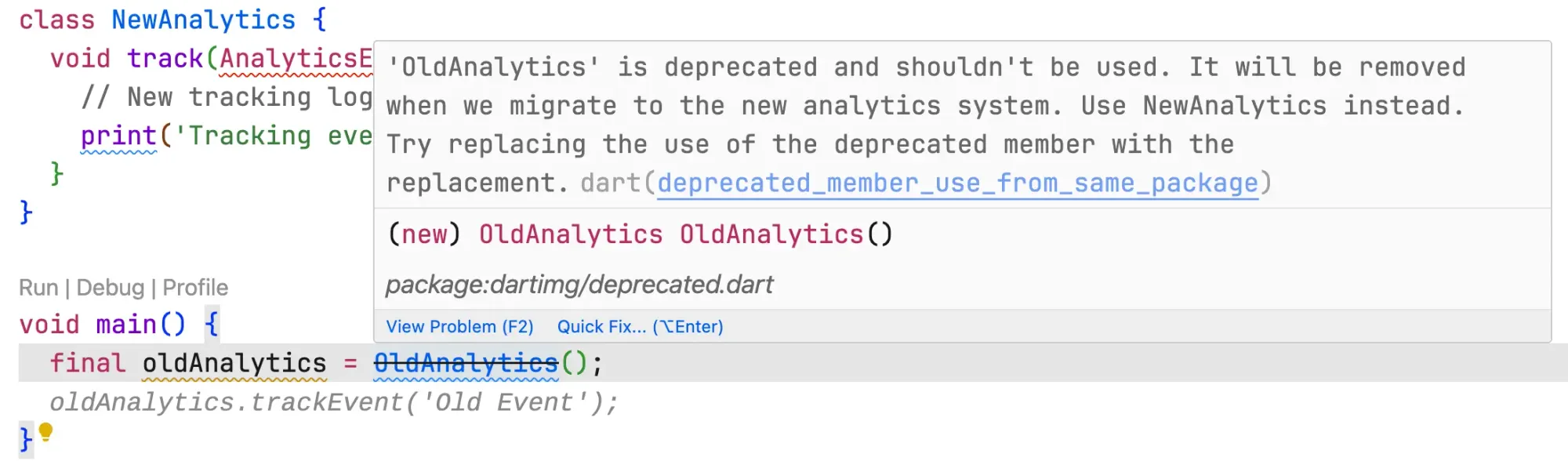
Include the recommended alternative in the @Deprecated message. This makes it easier to share knowledge, especially when working across teams. Now, if you try to use the OldAnalytics class, the analyzer will show a warning with the suggested replacement:
Handle Deprecation Warnings in CI
If you use continuous integration (CI), your pipeline likely formats, analyzes, and checks your code. A common issue is that the CI fails when it detects deprecation warnings.
To address this, you need a way to show deprecation warnings locally during development, while allowing CI to ignore them and pass.
You can solve this by creating a script that updates the analysis_options.yaml file during CI runs to ignore deprecations. For example:
FILE_PATH="analysis_options.yaml"

# Check if the file exists
if [ ! -f "$FILE_PATH" ]; then
  echo "Error: $FILE_PATH not found!"
  exit 1
fi

sed -i 's/deprecated_member_use_from_same_package: warning/deprecated_member_use_from_same_package: ignore/' "$FILE_PATH"
In your CI pipeline, run this script before executing dart analyze. This approach ensures that:
- Developers see deprecation warnings locally.
- CI ignores deprecation warnings and doesn't fail because of them.
Final Notes
When possible, migrate code gradually and in a controlled manner. Avoid large-scale rewrites in a single merge request; instead, break them into smaller, manageable changes. Use the @Deprecated annotation to support this.