Auth in Flutter


Authentication and authorization are crucial components of modern applications, ensuring that users can securely access and interact with the features and data they're entitled to. I'm starting a series of articles that dive deep into doing it right, with a focus on practical insights and essential theory. Let's tackle some key questions:
- Responding to Auth State Changes: How do we effectively monitor and react to changes in a user's authentication status?
- Creating an Auth Interceptor: How can we implement an authentication interceptor that incorporates token refresh and retry logic to handle failed requests seamlessly?
- Integrating Auth with Navigation: How do we tie authentication states to our navigation system, ensuring users are directed appropriately, and how do we leverage guards and deep links for a smoother user experience?
- App Initialization: What are the best practices for initializing an application with authentication in mind, ensuring a secure and user-friendly launch?
Final Result
Outline
Fundamentals
Authentication and authorization are fundamental security concepts that work hand-in-hand to ensure secure access to systems and resources. Here's an explanation of these concepts:
Authentication is the process of verifying the identity of a user, system, or entity before granting access to a system or resource. This can be accomplished by providing credentials, such as a username and password, biometric data (e.g., fingerprint, facial recognition), or other forms of identification. Authentication mechanisms can also involve multi-factor authentication (MFA), which adds an extra layer of security by requiring additional forms of verification, such as a one-time password or a physical token.
Authorization, on the other hand, is the process of determining the specific permissions, privileges, or access levels that an authenticated entity has within a system or resource. Authorization is based on predefined rules, policies, or roles that define what actions an authenticated entity is allowed to perform, such as reading, writing, modifying, or deleting data, executing specific functions, or accessing certain areas of a system.
The relationship between authentication and authorization can be summarized as follows:
- Authentication comes first: Before an entity can access a system or resource, its identity must be verified through the authentication process. This establishes trust and ensures that only legitimate users or systems can gain entry.
- Authorization follows: Once an entity's identity is authenticated, the authorization process kicks in to determine the specific actions or resources that the entity is permitted to access or perform within the system. This ensures that even authenticated entities can only access and perform operations based on their assigned roles, permissions, or privileges.
OAuth
OAuth (Open Authorization) is an authorization framework that enables secure, delegated access. It allows users to grant third-party applications limited access to their resources on a service without sharing their passwords, providing a standardized and secure approach to authorization across numerous systems.
OAuth defines the following key entities:
- Authorization Server: The server responsible for issuing access tokens to clients after successful authentication and authorization. It acts as a trusted intermediary between the resource owner, client, and resource server.
- Resource Server: The server that hosts the protected resources (data, APIs, etc.) and requires authorized access via access tokens.
- Resource Owner: The entity (typically a user) capable of granting access to their protected resources hosted on the resource server.
- Client: The application that requests access to protected resources on behalf of the resource owner and with their authorization.
The OAuth flow involves the client obtaining an access token from the authorization server after the resource owner grants permission. The client then uses this access token to make authorized requests to the resource server on the resource owner's behalf. Additionally, OAuth introduces the concept of refresh tokens, which are special tokens used solely to obtain new access tokens without requiring the resource owner's involvement.
By separating the roles of the authorization server and resource server, OAuth ensures that sensitive credentials, such as usernames and passwords, are never shared with third-party applications. This enhances security and provides a standardized and scalable approach to authorization across diverse systems and applications.
  +--------+                                           +---------------+
  |        |--(A)------- Authorization Grant --------->|               |
  |        |                                           |               |
  |        |<-(B)----------- Access Token -------------|               |
  |        |               & Refresh Token             |               |
  |        |                                           |               |
  |        |                            +----------+   |               |
  |        |--(C)---- Access Token ---->|          |   |               |
  |        |                            |          |   |               |
  |        |<-(D)- Protected Resource --| Resource |   | Authorization |
  | Client |                            |  Server  |   |     Server    |
  |        |--(E)---- Access Token ---->|          |   |               |
  |        |                            |          |   |               |
  |        |<-(F)- Invalid Token Error -|          |   |               |
  |        |                            +----------+   |               |
  |        |                                           |               |
  |        |--(G)----------- Refresh Token ----------->|               |
  |        |                                           |               |
  |        |<-(H)----------- Access Token -------------|               |
  +--------+           & Optional Refresh Token        +---------------+
To gain a deeper understanding of OAuth, I highly recommend reading the RFC 6749 specification.
Proposed Solution
This section gives an overview of a proposed solution, how it works, and what we're going to build today. I recommend reading this first before going to "How" to understand the idea clearly.
The solution outlines 3 main components:
- OAuthInterceptor - a class that intercepts requests and responses, refreshes tokens if possible, and logouts users otherwise
- TokenStorage - the actual place where the token info is stored that also connects all the components
- AuthorizationClient - a module that decides whether the token is valid or whether is it possible to refresh the token pair
OAuth interceptor
The OAuthInterceptor class handles both requests and responses, managing the authorization process. The HTTP protocol defines various headers, including the Authorization header, which is key for transmitting user credentials to the server. While we'll be using JWT access tokens in our setup, this header can carry any form of string-based credentials.
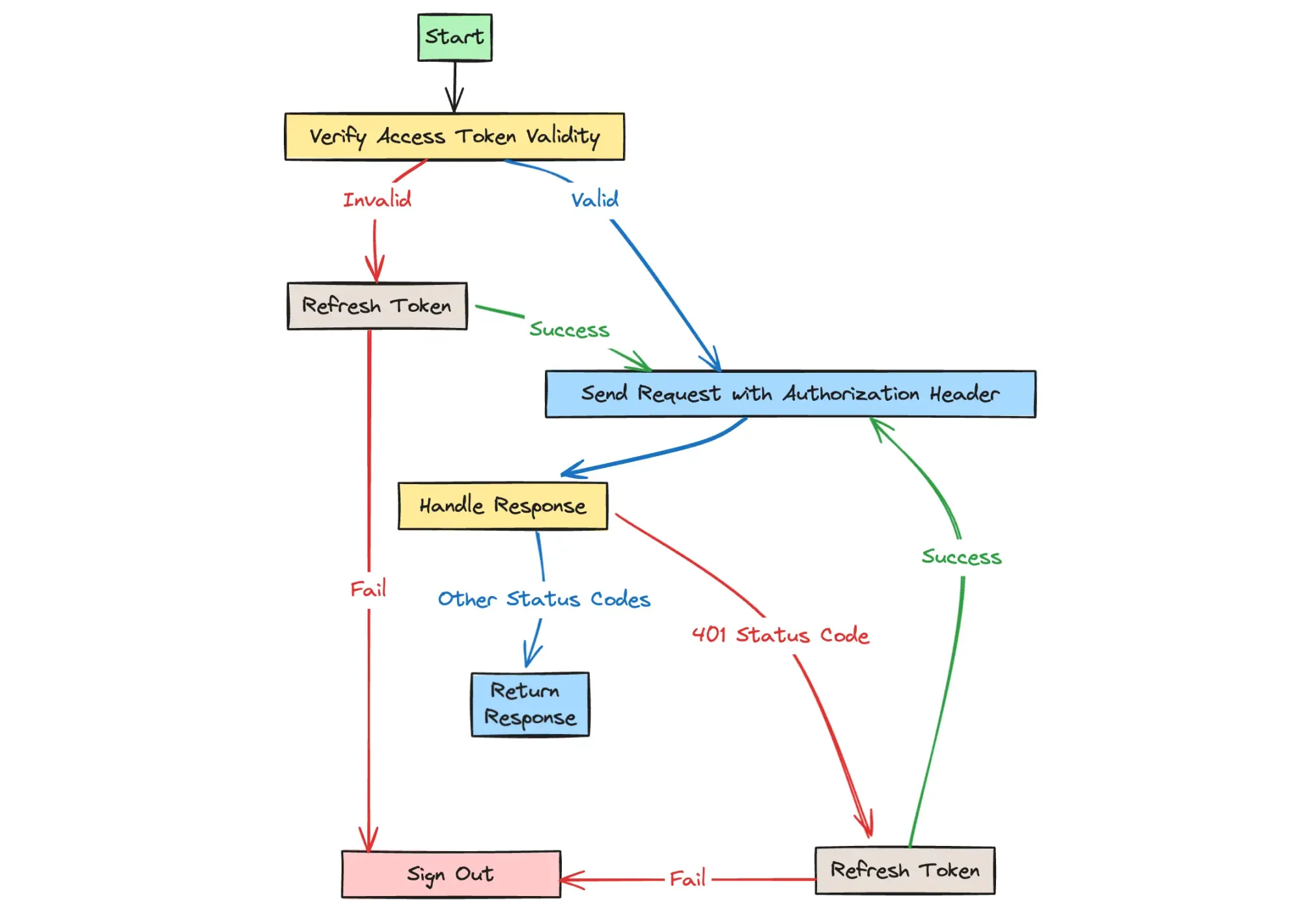
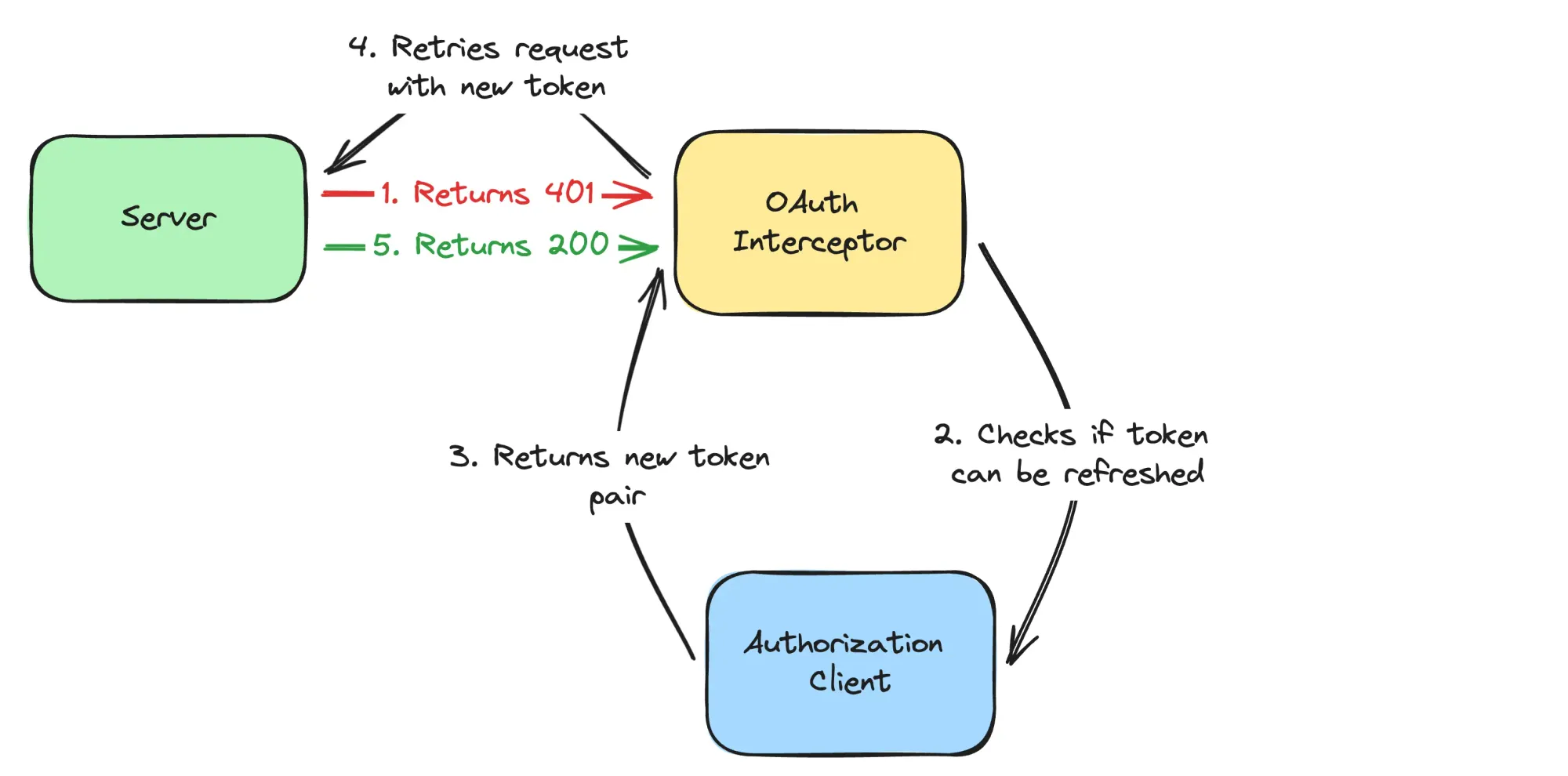
The core functionality of this interceptor involves appending the Authorization header to every outgoing request, ensuring the token is valid, and renewing it when necessary. The workflow can be summarized as follows:
- Verify that an access token is valid
- If the access token is invalid - refresh it if possible, otherwise log out
- Send the request with the
Authorizationheader - Return the response
- If the response has a 401 status code - refresh the token and retry the request if possible, otherwise sign out
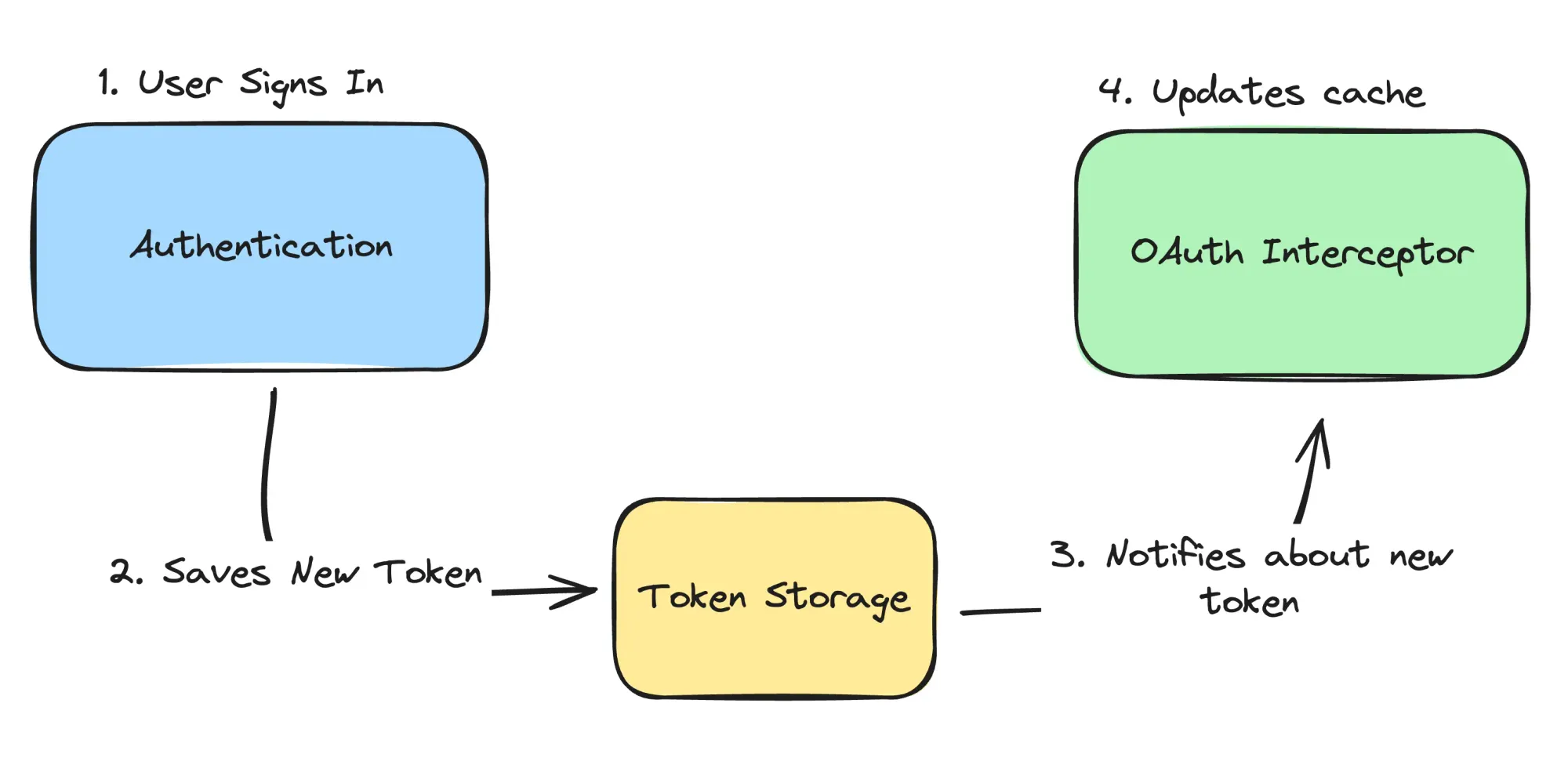
The OAuth interceptor also has the task of caching tokens to avoid loading them with every request, which can impact performance. This makes the OAuth interceptor responsible for maintaining the cache so that it is updated whenever the token changes.
A key problem is that tokens can be modified from multiple places, such as when a user logs in or out. If the interceptor doesn't monitor token changes, the cache won't be updated accordingly. Therefore, it's necessary to create a component whose task is to store the token on disk and broadcast any changes to the token. This component is called Token Storage.
Token Storage
Token storage is a component that controls how and where the token is stored on the device. It provides the ability to set or clear the token. In addition, it provides a stream that notifies of any changes to the token (this allows the state to be synchronized between the components).
Authorization Client
The AuthorizationClient offers functionality to verify the validity of tokens. While this step is not mandatory, it presents advantages for the system by preventing the client from inundating the server with requests using expired tokens. In addition, it provides a method to refresh the token.
The client is utilized by OAuthInterceptor just before a request is dispatched and when a 401 response is returned to check the token's validity. If the token is invalid, it attempts to refresh it or logs the user out. For a clearer illustration, refer to the diagram below:
Implementation
With a clear understanding of our requirements in place, we can now commence the building process. The first step involves the development of the foundational element: TokenStorage.
Token Storage
TokenStorage is a storage location for authorization information. It offers methods to update this information and provides a stream of changes. Below is its interface:
/// [TokenStorage] stores and manages the Auth token.
abstract interface class TokenStorage<T> {
  /// Load the Auth token from the storage.
  ///
  /// If this returns null, the client should assume that the user is not
  /// authenticated.
  Future<T?> load();

  /// Save the Auth token to the storage.
  ///
  /// This is used to persist the token pair after:
  ///  - A successful sign-in
  ///  - A successful token refresh
  ///
  /// Note, that this method should not be called when user logs out -
  /// use [clear] for that.
  Future<void> save(T tokenPair);

  /// Clears the Auth token.
  ///
  /// This can be used to clear the token pair, for example, when the user logs
  /// out or token pair is revoked / expired.
  Future<void> clear();

  /// Returns a stream of the Auth token.
  ///
  /// Every time the Auth token changes, the new value will be added to the
  /// stream.
  ///
  /// This is especially useful as [TokenStorage] can be used from
  /// different places and the token can be changed from any of them.
  /// For example, when user logs out, we need to update the value in
  /// the interceptor as well as in the bloc that holds the authentication
  /// state.
  Stream<T?> getStream();

  /// Closes the storage.
  ///
  /// After this method is called, the storage should not be used anymore.
  Future<void> close();
}
TokenStorage interface
This interface is designed to be independent of Flutter or any specific model by utilizing generics instead of fixed types, enhancing its flexibility for various implementations.
For our purposes, we'll use the shared_preferences library, though this choice is highly flexible. Alternatives, such as secure_flutter_storage, can also be considered based on your requirements.
/// {@template token_storage_sp}
/// Implementation of [TokenStorage] that uses [TypedEntry] to store
/// the authorization info.
/// {@endtemplate}
final class TokenStorageSP implements TokenStorage<Token> {
  /// {@macro token_storage_sp}
  TokenStorageSP({required SharedPreferences sharedPreferences})
      : _accessToken = TypedEntry(
          sharedPreferences: sharedPreferences,
          key: 'authorization.access_token',
        ),
        _refreshToken = TypedEntry(
          sharedPreferences: sharedPreferences,
          key: 'authorization.refresh_token',
        );

  late final PreferencesEntry<String> _accessToken;
  late final PreferencesEntry<String> _refreshToken;
  final _streamController = StreamController<Token?>.broadcast();

  @override
  Future<Token?> load() async {
    final accessToken = _accessToken.read();
    final refreshToken = _refreshToken.read();

    if (accessToken == null || refreshToken == null) {
      return null;
    }

    return Token(accessToken, refreshToken);
  }

  @override
  Future<void> save(Token tokenPair) async {
    await (
      _accessToken.set(tokenPair.accessToken),
      _refreshToken.set(tokenPair.refreshToken)
    ).wait;

    _streamController.add(tokenPair);
  }

  @override
  Future<void> clear() async {
    await (_accessToken.remove(), _refreshToken.remove()).wait;
    _streamController.add(null);
  }

  @override
  Stream<Token?> getStream() => _streamController.stream;

  @override
  Future<void> close() => _streamController.close();
}
TokenStorage implementation using shared_preferences
This guide will use the Token class, which includes access and refresh tokens. The storage solution implements the load, save, and clear methods. When the save or clear functions are invoked, the storage triggers the addition of a new event to a stream, thereby notifying of any changes.
TypedEntry from sizzle_starter to define a single entry that manages the entry in shared_preferences.Authorization Client
For the authorization client we will have the following interface:
/// The client that refreshes the Auth token using the refresh token.
abstract interface class AuthorizationClient<T> {
  /// Check if refresh token is valid
  FutureOr<bool> isRefreshTokenValid(T token);

  /// Check if access token is valid
  FutureOr<bool> isAccessTokenValid(T token);

  /// Refreshes the token.
  ///
  /// This method should throw the [RevokeTokenException] if token
  /// cannot be refreshed.
  Future<T> refresh(T token);
}
AuthorizationClient interface
It offers three methods for validating tokens, along with a refresh option. While this is entirely optional, it is recommended if your authorization system uses both access and refresh tokens (and it is possible to determine their life time on client).
JWT tokens have gained traction in the development community for their robust security and ease of use. These tokens can include valuable information in their payload, such as the exp field, which specifies the token's expiration time in UTC. Here's an example of how this client leverages it to verify token validity:
final class JWTAuthorizationClient implements AuthorizationClient<Token> {
  final Client _client;

  JWTAuthorizationClient(this._client);

  @override
  FutureOr<bool> isRefreshTokenValid(Token token) {
    final jwt = JWT.decode(token.refreshToken);

    // Check if JWT token is expired
    if (jwt.payload case {'exp': final int exp}) {
      return DateTime.now().isBefore(
        DateTime.fromMillisecondsSinceEpoch(exp),
      );
    }

    return false;
  }

  @override
  FutureOr<bool> isAccessTokenValid(Token token) {
    final jwt = JWT.decode(token.accessToken);

    // Check if JWT token is expired
    if (jwt.payload case {'exp': final int exp}) {
      return DateTime.now().isBefore(
        DateTime.fromMillisecondsSinceEpoch(exp),
      );
    }

    return false;
  }

  @override
  Future<Token> refresh(Token token) async {
    final response = await _client.post(
      Uri.parse('/refresh'),
      headers: {
        'Authorization': 'Bearer ${token.accessToken}',
      },
    );

    final json = jsonDecode(response.body);

    if (json
        case {
          'access_token': final String aToken,
          'refresh_token': final String rToken,
        }) {
      return Token(aToken, rToken);
    }

    throw const RevokeTokenException('Invalid token');
  }
}
OAuth Interceptor
Implementing the OAuth interceptor is a bit more complex because it needs to work seamlessly across all components, managing advanced authorization processes. In this guide, we'll use the http library for making HTTP requests and introduce the intercepted_client to handle both incoming and outgoing messages efficiently.
A key feature of our interceptor is its ability to deal with multiple requests at once, ensuring that even when several requests are made simultaneously, they're processed one after the other. This is crucial for scenarios where multiple requests might fail authentication simultaneously; in such cases, our setup ensures that only one attempt to refresh the authentication token is made, thanks to the SequentialInterceptor provided by intercepted_client.
/// AuthInterceptor is used to add the Auth token to the request header
/// and refreshes or clears the token if the request fails with a 401
class AuthInterceptor extends SequentialHttpInterceptor with RetryRequestMixin {
  /// Create an Auth interceptor
  AuthInterceptor({
    required this.tokenStorage,
    required this.authorizationClient,
    Client? retryClient,
    Token? token,
  })  : retryClient = retryClient ?? Client(),
        _token = token {
    tokenStorage.getStream().listen((newToken) => _token = newToken);
  }

  /// [Client] to retry the request
  final Client retryClient;

  /// [TokenStorage] to store and retrieve the token
  final TokenStorage<Token> tokenStorage;

  /// [AuthorizationClient] to refresh the token
  final AuthorizationClient<Token> authorizationClient;
  Token? _token;

  Future<Token?> _loadToken() async => _token;

  Map<String, String> _buildHeaders(Token token) => {
        'Authorization': 'Bearer ${token.accessToken}',
      };

  String? _extractTokenFromHeaders(Map<String, String> headers) {
    final authHeader = headers['Authorization'];
    if (authHeader == null || !authHeader.startsWith('Bearer ')) {
      return null;
    }

    return authHeader.substring(7);
  }

  // 1.0
  @override
  Future<void> interceptRequest(
    BaseRequest request,
    RequestHandler handler,
  ) async {
    // 1.1
    var token = await _loadToken();

    // If token is null, then the request is rejected
    if (token == null) {
      return handler.rejectRequest(
        const RevokeTokenException(
          'Token is not valid and cannot be refreshed',
        ),
      );
    }

    // 1.2
    // If token is valid, then the request is made with the token
    if (await authorizationClient.isAccessTokenValid(token)) {
      final headers = _buildHeaders(token);
      request.headers.addAll(headers);

      return handler.next(request);
    }

    // 1.3
    // If token is not valid and can be refreshed, then the token is refreshed
    if (await authorizationClient.isRefreshTokenValid(token)) {
      try {
        // 1.4
        // Even if refresh token seems to be valid from the client side,
        // it may be revoked / banned / deleted on the server side, so
        // the following method can throw the error.
        token = await authorizationClient.refresh(token);
        await tokenStorage.save(token);

        final headers = _buildHeaders(token);
        request.headers.addAll(headers);

        return handler.next(request);
        // If authorization client decides that the token is no longer
        // valid, it throws [RevokeTokenException] and user should be logged out
      } on RevokeTokenException catch (e) {
        // 1.5
        // If token cannot be refreshed, then user should be logged out
        await tokenStorage.clear();
        return handler.rejectRequest(e);
        // However, if another error occurs, like internet connection error,
        // then we should not log out the user, but just reject the request
      } on Object catch (e) {
        // 1.6
        return handler.rejectRequest(e);
      }
    }

    // 1.7
    // If token is not valid and cannot be refreshed,
    // then user should be logged out
    await tokenStorage.clear();
    return handler.rejectRequest(
      const RevokeTokenException('Token is not valid and cannot be refreshed'),
    );
  }

  // 2.0
  @override
  Future<void> interceptResponse(
    StreamedResponse response,
    ResponseHandler handler,
  ) async {
    // 2.1
    // If response is 401 (Unauthorized), then Access token is expired
    // and, if possible, should be refreshed
    if (response.statusCode != 401) {
      return handler.resolveResponse(response);
    }

    // 2.2
    var token = await _loadToken();

    // If token is null, then reject the response
    if (token == null) {
      return handler.rejectResponse(
        const RevokeTokenException(
          'Token is not valid and cannot be refreshed',
        ),
      );
    }

    final tokenFromHeaders = _extractTokenFromHeaders(
      response.request?.headers ?? const {},
    );

    if (tokenFromHeaders == null) {
      return handler.resolveResponse(response);
    }

    // 2.3
    // If token is the same, refresh the token
    if (tokenFromHeaders == token.accessToken) {
      // 2.4
      if (await authorizationClient.isRefreshTokenValid(token)) {
        try {
          // 2.5
          // Even if refresh token seems to be valid from the client side,
          // it may be revoked / banned / deleted on the server side, so
          // the following method can throw the error.
          token = await authorizationClient.refresh(token);
          await tokenStorage.save(token);
          // If authorization client decides that the token is no longer
          // valid, it throws [RevokeTokenException] and user should be logged
          // out
        } on RevokeTokenException catch (e) {
          // 2.6
          // If token cannot be refreshed, then user should be logged out
          await tokenStorage.clear();
          return handler.rejectResponse(e);
          // However, if another error occurs, like internet connection error,
          // then we should not log out the user, but just reject the response
        } on Object catch (e) {
          // 2.7
          return handler.rejectResponse(e);
        }
      } else {
        // 2.8
        // If token cannot be refreshed, then user should be logged out
        await tokenStorage.clear();
        return handler.rejectResponse(
          const RevokeTokenException(
            'Token is not valid and cannot be refreshed',
          ),
        );
      }
    }

    // 2.9
    // If token is different, then the token is already refreshed
    // and the request should be made again
    final newResponse = await retryRequest(response, retryClient);

    return handler.resolveResponse(newResponse);
  }
}
This interceptor, built on the algorithm we discussed, takes care of authorization headers for HTTP requests, handles token refreshes, and manages user sessions when tokens become invalid. It uses critical operations identified by annotations (e.g., 1.4, 2.4). The OAuthInterceptor utilizes two primary methods, interceptRequest (1.0) and interceptResponse (2.0), from the SequentialInterceptor API in the intercepted_client library.
Request Interception (interceptRequest - 1.0)
When an HTTP request starts, the interceptRequest method steps in. It first tries to get a cached token with the _loadToken method (1.1). If there's no token, the request is halted. If there is a valid access token (1.2), the interceptor adds an 'Authorization' header to the request. If the access token has expired, it checks if the refresh token is still valid (1.3). A valid refresh token leads to a token refresh operation using the AuthorizationClient.refresh method (1.4). SequentialInterceptor ensures all outgoing requests are paused until the token is refreshed, avoiding the issue of multiple simultaneous refresh requests. If both tokens are expired, the interceptor clears the token storage, effectively logging the user out (1.7).
Error Handling and Token Refresh Mechanism
A key feature of the interceptRequest method is its approach to error handling, particularly during the token refresh phase. If the refresh attempt fails because of a RevokeTokenException—which means the token has been revoked or banned by the server—the interceptor wipes the token storage and rejects the request, essentially logging the user out (1.5). For other errors, like those caused by internet connectivity issues, the request is simply rejected without logging the user out. This strategy prevents users from being logged out when there's no need, dealing smartly with temporary server or network issues.
Response Interception (interceptResponse - 2.0)
Upon getting an initial response, which includes at least the status code and headers, the interceptor decides the next steps based on this info. If the server's response has a status code other than 401, the interceptor simply passes this response along (2.1). However, if the status code is 401, the interceptor tries to fetch the token from the cache. If the token is missing (null), it outright rejects the response (2.2).
If there's a token, the interceptor checks it against one from the headers (2.3) to see if it's been updated. This prevents triggering multiple refresh requests due to several 401 response failures.
The next actions are similar to those in the request interceptor: it tries a token refresh. If the token refresh is successful, the request is retried with the new token (2.9). If the refresh attempt fails, the user is logged out (2.6, 2.8).
Managing token cache
Besides its primary function, the interceptor plays a vital role in keeping the token cache fresh and "valid" by monitoring updates in the token storage. This step is crucial because not all token changes pass through the interceptor. By keeping an eye on the TokenStorage, the interceptor makes sure the token cache stays up-to-date.
Time for authentication
We're diving into the authentication phase! In this stage, we'll create four key components:
AuthDataSource: This component interacts with the HTTP client to manage user sign-in, sign-up, and sign-out operations by exchanging data with the backend.AuthRepository: UtilizingAuthDataSource, this component updates theTokenStoragewith any changes. So, when a user logs in successfully, the new token pair is saved. Additionally,AuthRepositorykeeps an eye on the token stream fromTokenStorage.AuthBloc: A bloc that oversees the authentication process and monitors any updates in token storage, making use of the stream from the repository.AuthScope: While optional, it's recommended to use this component above theAuthBloc. It providesAuthBlocto its children, making the API easier to use through theInheritedWidget.
So, the data source interface looks as follows:
/// Data source for authentication
abstract interface class AuthDataSource<T> {
  /// Sign in with email and password
  Future<T> signInWithEmailAndPassword(String email, String password);

  /// Sign out
  Future<void> signOut();
}
AuthDataSource interface
Currently, we have two primary methods: signIn and signOut. However, it allows for additional authentication methods as needed, such as signUp, or signing in through third-party services like Google or Apple.
Implementations of this interface should ensure that a new token is returned upon a successful signIn request. Optionally, they may also provide functionality to invalidate the token when the signOut method is invoked. Here's an example of how a class might implement this interface:
/// Auth data source that interacts with the backend
/// and interprets the response as [Token] or throws [AuthenticationException]
final class AuthDataSourceNetwork implements AuthDataSource<Token> {
  final Client _client;

  /// Create an [AuthDataSourceNetwork]
  const AuthDataSourceNetwork({required Client client}) : _client = client;

  @override
  Future<Token> signInWithEmailAndPassword(
    String email,
    String password,
  ) async {
    final response = await _client.post(
      Uri.parse('/login'),
      body: {
        'email': email,
        'password': password,
      },
    );

    final body = jsonDecode(response.body);

    // Check if the response is an error
    if (body
        case {
          'error': {
            // optional message provided by the server
            'message': final String message,
            // system error code
            'code': final int code,
          }
        }) {
      throw switch (code) {
        WrongCredentialsException.code => const WrongCredentialsException(),
        _ => UnknownAuthenticationException(code: code, error: message)
      };
    }

    // Check if response contains access_token and refresh_token
    if (body
        case {
          'access_token': final String accessToken,
          'refresh_token': final String refreshToken,
        }) {
      return Token(accessToken, refreshToken);
    }

    // If we can't understand the response, throw a format exception
    throw FormatException(
      'Returned response is not understood by the application',
      body,
    );
  }

  @override
  Future<void> signOut() async {}
}
Implementation of AuthDataSource
This class handles login requests to the backend and manages the response. If the response indicates an error, the class transforms this error into an exception and throws it. This enables blocs or widgets to catch it and display a detailed error message. On the other hand, if the response is successful and contains access and refresh tokens, these tokens are returned.
The data source is subsequently utilized by the AuthRepository. Below is how this class connects with the token storage as well:
/// AuthRepository
abstract interface class AuthRepository<T> implements AuthStatusSource {
  /// Sign in with email and password
  Future<T> signInWithEmailAndPassword(String email, String password);

  /// Sign out
  Future<void> signOut();
}

/// AuthRepositoryImpl
final class AuthRepositoryImpl<T> implements AuthRepository<T> {
  final AuthDataSource<T> _dataSource;
  final TokenStorage<T> _storage;

  /// Create an [AuthRepositoryImpl]
  const AuthRepositoryImpl({
    required AuthDataSource<T> dataSource,
    required TokenStorage<T> storage,
  })  : _dataSource = dataSource,
        _storage = storage;

  @override
  Future<T> signInWithEmailAndPassword(
    String email,
    String password,
  ) async {
    final token = await _dataSource.signInWithEmailAndPassword(email, password);
    await _storage.save(token);

    return token;
  }

  @override
  Future<void> signOut() async {
    await _dataSource.signOut();
    await _storage.clear();
  }

  @override
  Stream<AuthenticationStatus> get authStatus => _storage.getStream().map(
        (token) => token != null
            ? AuthenticationStatus.authenticated
            : AuthenticationStatus.unauthenticated,
      );
}
AuthRepository implementation
The AuthRepository acts as a middleman, directing calls to the AuthDataSource and updating the token in storage based on the operation. Specifically, it replaces the token with a new one during sign-in actions and completely removes the token when signing out. Additionally, it emits a stream of AuthenticationStatus changes, which the AuthBloc utilizes later on.
Moving on to the AuthBloc, its main function is to oversee and maintain the authentication state, offering specific methods to modify the authentication status (sign in / sign out). Here's an outline of how it might be structured:
/// AuthBloc
final class AuthBloc extends Bloc<AuthEvent, AuthState> with SetStateMixin {
  final AuthRepository<Object> _authRepository;

  /// Create an [AuthBloc]
  ///
  /// This specializes required initialState as it should be preloaded.
  AuthBloc(
    super.initialState, {
    required AuthRepository<Object> authRepository,
  }) : _authRepository = authRepository {
    on<AuthEvent>(
      (event, emit) => switch (event) {
        final _SignInWithEmailAndPassword e =>
          _signInWithEmailAndPassword(e, emit),
        final _SignOut e => _signOut(e, emit),
      },
    );

    // emit new state when the authentication status changes
    authRepository.authStatus
        .map(($status) => AuthState.idle(status: $status))
        .listen(($state) {
      if ($state != state) {
        setState($state);
      }
    });
  }

  Future<void> _signOut(
    _SignOut event,
    Emitter<AuthState> emit,
  ) async {
    emit(AuthState.processing(status: state.status));

    try {
      await _authRepository.signOut();
      emit(const AuthState.idle(status: AuthenticationStatus.unauthenticated));
    } on Object catch (e, stackTrace) {
      emit(
        AuthState.error(
          status: AuthenticationStatus.unauthenticated,
          error: e,
        ),
      );
      onError(e, stackTrace);
    }
  }

  Future<void> _signInWithEmailAndPassword(
    _SignInWithEmailAndPassword event,
    Emitter<AuthState> emit,
  ) async {
    emit(AuthState.processing(status: state.status));

    try {
      await _authRepository.signInWithEmailAndPassword(
        event.email,
        event.password,
      );
      emit(const AuthState.idle(status: AuthenticationStatus.authenticated));
    } on Object catch (e, stackTrace) {
      emit(
        AuthState.error(
          status: AuthenticationStatus.unauthenticated,
          error: e,
        ),
      );
      onError(e, stackTrace);
    }
  }
}
AuthBloc implementation
The AuthBloc primarily serves as a central hub for managing authentication state. It implements two crucial functions: signIn and signOut, leveraging the repository's capabilities to modify the state accordingly. A vital feature of this bloc is its ability to listen to the authStatus stream, responding with appropriate states based on incoming events.
The final piece in this setup is the AuthScope. Here's how it's put together:
/// Auth controller
abstract interface class AuthController {
  /// Authentication status
  AuthenticationStatus get status;

  /// Sign in with email and password
  void signInWithEmailAndPassword(String email, String password);

  /// Sign out
  void signOut();
}

/// Scope that controls the authentication state
class AuthScope extends StatefulWidget {
  /// Create an [AuthScope]
  const AuthScope({required this.child, super.key});

  /// The child widget
  final Widget child;

  /// Get the [AuthController] from the [BuildContext]
  static AuthController of(BuildContext context, {bool listen = true}) =>
      context.inhOf<_AuthInherited>(listen: listen).controller;

  @override
  State<AuthScope> createState() => _AuthScopeState();
}

class _AuthScopeState extends State<AuthScope> implements AuthController {
  late final AuthBloc _authBloc;
  late AuthState _state;

  @override
  void initState() {
    super.initState();
    _authBloc = DependenciesScope.of(context).authBloc;
    _state = _authBloc.state;
  }

  @override
  AuthenticationStatus get status => _state.status;

  @override
  void signInWithEmailAndPassword(
    String email,
    String password,
  ) =>
      _authBloc.add(
        AuthEvent.signInWithEmailAndPassword(
          email: email,
          password: password,
        ),
      );

  @override
  void signOut() => _authBloc.add(const AuthEvent.signOut());

  @override
  Widget build(BuildContext context) => BlocBuilder<AuthBloc, AuthState>(
        bloc: _authBloc,
        builder: (context, state) {
          _state = state;

          return _AuthInherited(
            controller: this,
            state: _authBloc.state,
            child: widget.child,
          );
        },
      );
}

final class _AuthInherited extends InheritedWidget {
  final AuthController controller;
  final AuthState state;

  const _AuthInherited({
    required super.child,
    required this.controller,
    required this.state,
  });

  @override
  bool updateShouldNotify(covariant _AuthInherited oldWidget) =>
      state != oldWidget.state;
}
AuthScope implementation
The AuthScope encapsulates the AuthBloc within it, adhering to the AuthController interface. By wrapping controllers in scopes, several advantages emerge, such as a streamlined API, restricted access tailored to specific needs, enhanced abstraction, and the flexibility to incorporate extra functionalities.
Conclusion
Part one is wrapping up, and we've made great progress. In the next part, we'll dive into navigation, including guards, redirection, and deep links, and discuss strategies for a smooth application initialization. See you in the next chapter!