Designing State Management and Business Logic in Flutter

State management and business logic are two critical parts of the application architecture. This article explains how to distinguish between them and how to implement BLoC correctly.
Table of Contents
- Core Concepts
- Fundamental Design Patterns
- The BLoC Pattern
- Implementing BLoC
- Reacting to State Changes
- BLoC Best Practices
Core Concepts
Before we dive into the deep end, let's familiarize ourselves with the stars of today's topic - state management and business logic.
Business Logic
Business logic is the part of a system that determines how data is computed (e.g., loaded from cache/server) and transformed. It is responsible for:
- Processing and validating data
- Interacting with external services or APIs
- Enforcing business rules or constraints (e.g. min password length is 8 symbols)
- Handling error conditions and edge cases related to the business domain
State Management
State management orchestrates the flow of data within an application. It provides mechanisms for:
- Updating state in response to actions or events
- Notifying components of changes
- Providing a structured way for UI elements to access and interact with the current state
The function of state management is to respond to the logic of business operations. For example, the business logic loads weather data, while the state management updates the state and notifies all dependent entities of the change.
Fundamental Design Patterns
A design pattern describes organization the code of a computer program around a specific, well-defined functionality. The rationale behind the use of design patterns is to leverage existing concepts rather than reinventing them. This can reduce the time required to develop software and enhance the quality of the resulting program.
Observer Pattern
The Observer pattern is a behavioral design pattern where a "Publisher" maintains a list of dependent objects (Observers). When the Publisher's state changes, it notifies all its Observers.
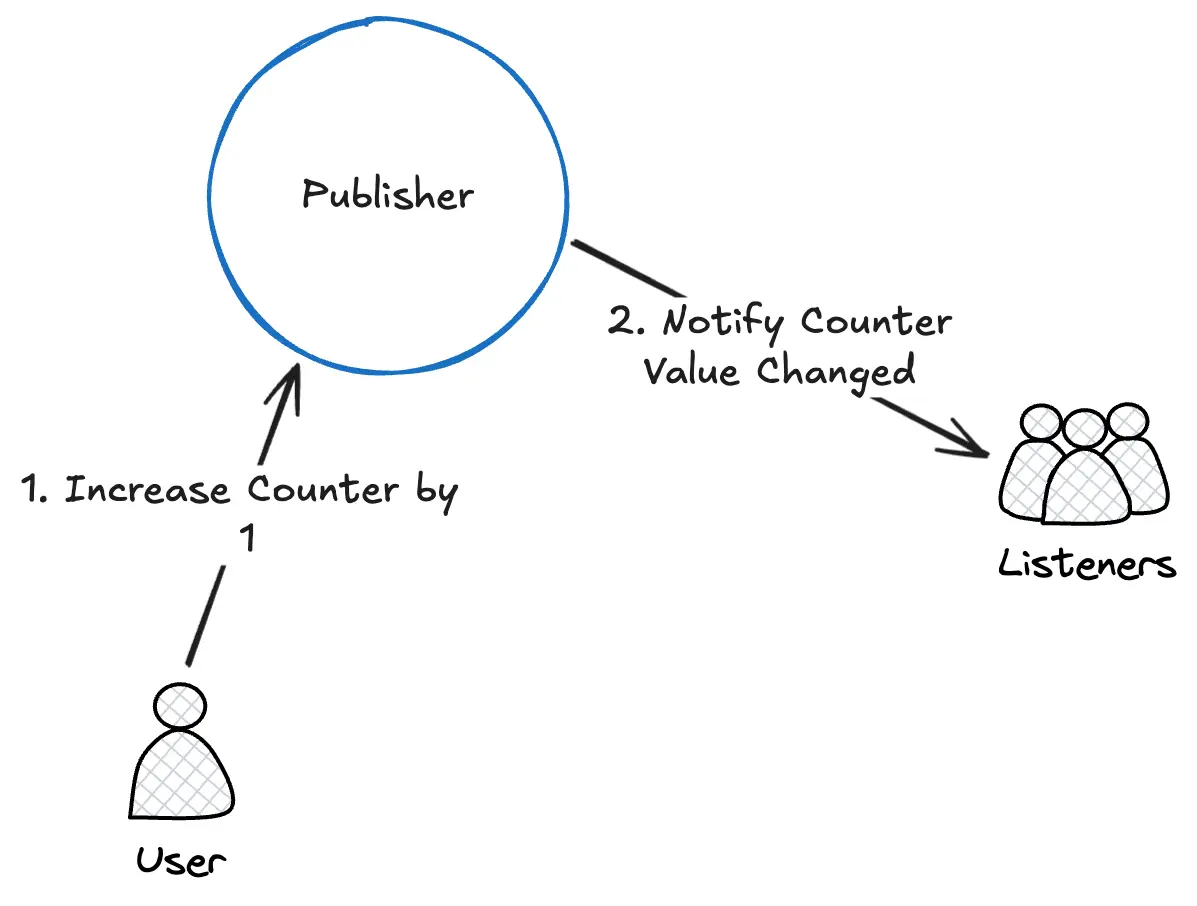
In Flutter, this pattern is implemented through the Listenable interface:
abstract class Listenable {
  void addListener(VoidCallback listener);
  void removeListener(VoidCallback listener);
}
Flutter's ChangeNotifier mixin implements this interface, providing a notifyListeners() method to notify all registered listeners.
State Pattern
The State pattern allows an object to alter its behavior when its internal state changes. It's particularly useful for managing finite states in a program. For example, consider a class designed to fetch a user profile:
- Initiate Request: Set state to "processing" and begin an HTTP request.
- Handle Response:
- Success: Transition to "success" state.
- Failure: Update to "failed" state.
This structure ensures clear and predictable state transitions during asynchronous operations.
The BLoC Pattern
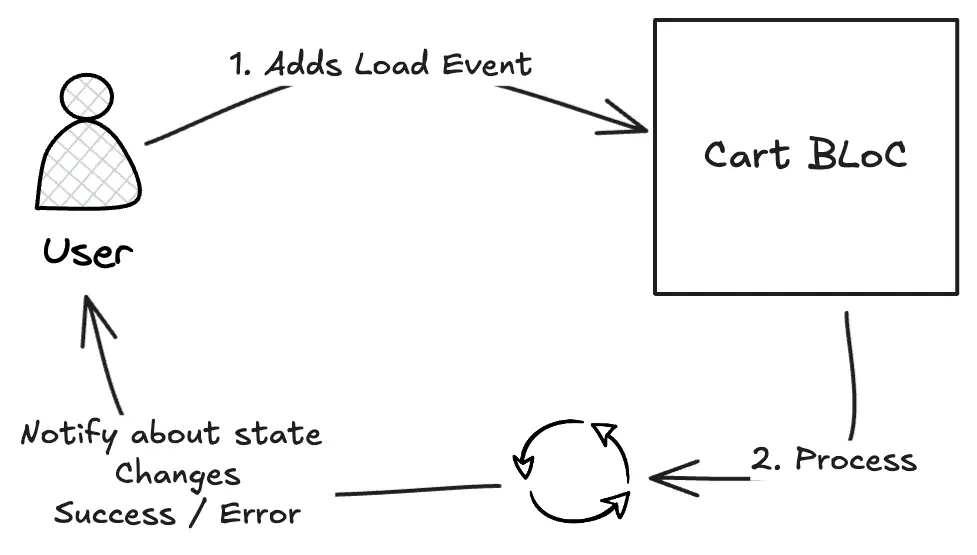
The Business Logic Component (BLoC) pattern, introduced at a Dart conference in 2018, has gained significant popularity in the Flutter community. It effectively separates business logic from the user interface (UI) layer.
Why Choose BLoC?
- Organized and Decoupled Business Logic: BLoC isolates business logic in clean, independent modules, making the codebase more maintainable and scalable.
- Predictability and Transparency: BLoC explicitly defines event subscriptions and their corresponding state changes, allowing developers to track event flows and their outcomes easily.
- Advanced Event Handling: BLoC offers tools like event transformers, allowing developers to control how events are processed (sequentially, concurrently, or in a custom order).
- Proven Track Record: BLoC has been successfully implemented in countless projects of all sizes, from simple apps to complex enterprise systems.
Responsibilities of a BLoC
- Managing Business Logic: BLoC centralizes and handles all business logic, determining data sources and processing based on application rules.
- Managing State: After executing business logic, BLoC updates and manages the state, ensuring changes are predictable and controlled.
- Ensuring Environment Independence: A well-designed BLoC should work seamlessly across different environments (Flutter apps, console applications, Dart Web) by relying on abstract, platform-independent states.
Implementing BLoC
This section will show you how to create production-ready BLoCs, how to respond to state changes (e.g., to display a SnackBar or dialog from the UI), how to handle errors, and how to synchronize the state between multiple BLoCs.
The generic BLoC implementation should have a way to add events to it, see its state, and be notified of any state changes in it. This can be achieved in many different ways, such as using the Listenable interface mentioned earlier, or using streams. In this article we will focus on the most popular implementation called bloc.
Simple BLoC example
To begin with, let's create a simple bloc for the counter app:
/// The events which `CounterBloc` will react to.
sealed class CounterEvent {}

/// Notifies bloc to increment state.
final class CounterIncrementPressed extends CounterEvent {}

/// A `CounterBloc` which handles converting `CounterEvent`s into `int`s.
class CounterBloc extends Bloc<CounterEvent, int> {
  /// The initial state of the `CounterBloc` is 0.
  CounterBloc() : super(0) {
    /// When a `CounterIncrementPressed` event is added,
    /// the current `state` of the bloc is accessed via the `state` property
    /// and a new state is emitted via `emit`.
    on<CounterEvent>(
      (event, emit) => switch (event) {
        CounterIncrementPressed _ => emit(state + 1),
      }
    );
  }
}
This BLoC handles CounterEvents and maintains an integer state, incrementing it when a CounterIncrementPressed event is received.
Designing Good BLoCs
Let’s now design a more robust, production-ready BLoC. Typically, BLoCs work with repositories or data sources to manage business logic and state. For this example, we’ll implement a BLoC to handle user profile management, including both retrieving and updating user information.
UserProfileRepository will provide two methods - fetch and update the profile:
abstract interface class UserProfileRepository {
  Future<UserProfile> fetchUserProfile();

  Future<void> updateUserProfile(UserProfile userProfile);
}
The events and states for this bloc are as follows:
sealed class UserProfileEvent {
  const UserProfileEvent();
}

final class UserProfileEventFetch extends UserProfileEvent {
  const UserProfileEventFetch();
}

final class UserProfileEventUpdate extends UserProfileEvent {
  const UserProfileEventUpdate(this.userProfile);

  final UserProfile userProfile;
}

sealed class UserProfileState {
  const UserProfileState({
    this.userProfile,
  });

  final UserProfile? userProfile;
}

/// State when BLoC is idling (doing nothing)
final class UserProfileStateIdle extends UserProfileState {
  const UserProfileStateIdle({super.userProfile});

  @override
  int get hashCode => Object.hashAll([userProfile]);

  @override
  bool operator ==(Object other) =>
      identical(this, other) || other is UserProfileStateIdle && userProfile == other.userProfile;
}

/// State when BLoC is processing (fetching or updating user profile)
final class UserProfileStateProcessing extends UserProfileState {
  const UserProfileStateProcessing({super.userProfile});

  @override
  int get hashCode => Object.hashAll([userProfile]);

  @override
  bool operator ==(Object other) =>
      identical(this, other) || other is UserProfileStateProcessing && userProfile == other.userProfile;
}

/// State when BLoC has successfully finished computation
final class UserProfileStateSuccess extends UserProfileState {
  const UserProfileStateSuccess({required this.userProfile});

  // override this field to be non-nullable
  // because when state is loaded, it should have a value
  @override
  final UserProfile userProfile;

  @override
  int get hashCode => Object.hashAll([userProfile]);

  @override
  bool operator ==(Object other) =>
      identical(this, other) || other is UserProfileStateSuccess && userProfile == other.userProfile;
}

/// State when BLoC has encountered an error
final class UserProfileStateError extends UserProfileState {
  const UserProfileStateError(this.error, {super.userProfile});

  /// Actual error object
  ///
  /// This can be used by the UI to display error message.
  final Object error;

  @override
  int get hashCode => Object.hashAll([error]);

  @override
  bool operator ==(Object other) =>
      identical(this, other) || other is UserProfileStateError && error == other.error;
}
The UserProfileBloc can exist in one of four states:
- Idle: This is the initial or resting state, where no actions are currently being performed.
- Processing: This state indicates that the BLoC is executing an action, such as fetching or updating the user profile.
- Success: Represents the successful completion of an action, where the user profile data has been successfully retrieved or updated. In this state, the UserProfile field is guaranteed to be non-null.
- Error:Occurs when an error or issue is encountered. This state contains an error object that provides specific information the UI can use to handle the problem appropriately.
Each state can optionally include a UserProfile object, but only the Loaded state guarantees that this field is populated with valid data. The Error state contains detailed information about the error, allowing the UI to provide meaningful feedback or error handling.
Additionally, all states should implement equality functions. This is crucial for efficient state management in BLoCs, as it allows the framework to accurately determine when the state has changed, preventing unnecessary rebuilds of the UI.
This is how the bloc looks like:
final class UserProfileBloc extends Bloc<UserProfileEvent, UserProfileState> {
  UserProfileBloc({
    required this.userProfileRepository,
  }) : super(const UserProfileStateIdle()) {
    on<UserProfileEvent>(
      (event, emit) => switch (event) {
        UserProfileEventFetch() => _fetchUserProfile(event, emit),
        UserProfileEventUpdate() => _updateUserProfile(event, emit),
      },
      // BE SURE TO INCLUDE THIS LINE TO MAKE THE PROCESSING SEQUENTIAL
      // OR ADD IT TO GLOBAL TRANSFORMER
      transformer: (events, mapper) => events.asyncExpand(mapper),
    );
  }

  final UserProfileRepository userProfileRepository;

  Future<void> _fetchUserProfile(
    UserProfileEventFetch event,
    Emitter<UserProfileState> emit,
  ) async {
    emit(UserProfileStateProcessing(userProfile: state.userProfile));

    try {
      final userProfile = await userProfileRepository.fetchUserProfile();
      emit(UserProfileStateSuccess(userProfile: userProfile));
    } on Object catch (error, stackTrace) {
      emit(UserProfileStateError(error, userProfile: state.userProfile));
      // It is important to report unknown error
      // Otherwise, it will be lost and you won't know what happened
      onError(error, stackTrace);
    }
  }

  Future<void> _updateUserProfile(
    UserProfileEventUpdate event,
    Emitter<UserProfileState> emit,
  ) async {
    final previousProfile = state.userProfile;
    emit(UserProfileStateProcessing(userProfile: event.userProfile));

    try {
      await userProfileRepository.updateUserProfile(event.userProfile);
      emit(UserProfileStateSuccess(userProfile: event.userProfile));
    } on Object catch (error, stackTrace) {
      emit(UserProfileStateError(error, userProfile: previousProfile));
      // It is important to report unknown error
      // Otherwise, it will be lost and you won't know what happened
      onError(error, stackTrace);
    }
  }
}
This BLoC handles fetching and updating user profiles, with proper error handling and state management. There are a few important moments:
- When using the bloc library, you should set the correct transformer, e.g. sequential, as shown in the code snippet. Otherwise, multiple events will be processed together, resulting in an inconsistent state.
- The code in handlers may throw an exception, which should be caught in the try block. If an unexpected error occurs, it should be reported to the onError method so that it doesn't get silenced.
Reacting to State Changes
An essential part of working with BLoCs is reacting to state changes. In the Flutter App Architecture, end clients of BLoCs are widgets that control their lifecycle and setup reactions (e.g. show a snack bar "You have successfully sent money").
BLoC exposes a stream field that notifies about any state changes. Additionally, the flutter_bloc package provides BlocBuilder and BlocListener widgets that you can use to rebuild the widget with new data / react to state changes:
// Manually setup listener
userProfileBloc.stream.listen((state) {
  print('User profile: ${state.userProfile.name}');
});

// Rebuild the widget when the state changes
BlocBuilder<UserProfileBloc, UserProfileState>(
  bloc: userProfileBloc,
  builder: (context, state) => Text(state.userProfile.name ?? 'Unknown'),
);

// Setup a reaction to the state change
BlocListener<UserProfileBloc, UserProfileState>(
  bloc: userProfileBloc,
  listener: (context, state) {
    final error = switch (state) {
      UserProfileStateError(error, _) => error,
      _ => null,
    };

    // If error is not null, show a snackbar
    if (error != null) {
      ScaffoldMessenger.of(context).showSnackBar(
        SnackBar(content: Text('Error: $error')),
      );
    }
  },
);
Different ways of reacting to state changes
All communication between BLoCs should occur through the widget layer. For instance, if one BLoC requires data from another or if data needs to be added immediately after a BLoC succeeds, this interaction should be handled via listeners in the widget layer.
However, some scenarios call for more complex responses. Imagine a situation where, after fetching the user’s profile data, a snackbar needs to display “profile data is being shown,” and when the data is updated, it needs to show “the data is being updated.” The challenge here is that simply listening to the state won’t work—both cases result in a success state, and there’s no way to differentiate between them just by observing the state.
In such cases, you may need to store the event in states. It is also necessary to override equality for events. Updated events and states will look like this:
sealed class UserProfileEvent {
  const UserProfileEvent();
}

final class UserProfileEventFetch extends UserProfileEvent {
  const UserProfileEventFetch();

  @override
  int get hashCode => 0;

  @override
  bool operator ==(Object other) => identical(this, other) || other is UserProfileEventFetch;
}

final class UserProfileEventUpdate extends UserProfileEvent {
  const UserProfileEventUpdate(this.userProfile);

  final UserProfile userProfile;

  @override
  int get hashCode => Object.hashAll([userProfile]);

  @override
  bool operator ==(Object other) =>
      identical(this, other) || other is UserProfileEventUpdate && userProfile == other.userProfile;
}

sealed class UserProfileState {
  const UserProfileState({
    this.lastEvent,
    this.userProfile,
  });

  final UserProfileEvent? lastEvent;
  final UserProfile? userProfile;
}

/// State when BLoC is idling (doing nothing)
final class UserProfileStateIdle extends UserProfileState {
  const UserProfileStateIdle({super.userProfile, super.lastEvent});

  @override
  int get hashCode => Object.hashAll([userProfile, lastEvent]);

  @override
  bool operator ==(Object other) =>
      identical(this, other) ||
      other is UserProfileStateIdle && userProfile == other.userProfile && lastEvent == other.lastEvent;
}

/// State when BLoC is processing (fetching or updating user profile)
final class UserProfileStateProcessing extends UserProfileState {
  const UserProfileStateProcessing({super.userProfile, super.lastEvent});

  @override
  int get hashCode => Object.hashAll([userProfile, lastEvent]);

  @override
  bool operator ==(Object other) =>
      identical(this, other) ||
      other is UserProfileStateProcessing && userProfile == other.userProfile && lastEvent == other.lastEvent;
}

/// State when BLoC has successfully loaded user profile
final class UserProfileStateSuccess extends UserProfileState {
  const UserProfileStateSuccess({required this.userProfile, super.lastEvent});

  // override this field to be non-nullable
  // because when state is loaded, it should have a value
  @override
  final UserProfile userProfile;

  @override
  int get hashCode => Object.hashAll([userProfile, lastEvent]);

  @override
  bool operator ==(Object other) =>
      identical(this, other) ||
      other is UserProfileStateSuccess && userProfile == other.userProfile && lastEvent == other.lastEvent;
}

/// State when BLoC has encountered an error
final class UserProfileStateError extends UserProfileState {
  const UserProfileStateError(this.error, {super.userProfile, super.lastEvent});

  /// Actual error object
  ///
  /// This can be used by the UI to display error message.
  final Object error;

  @override
  int get hashCode => Object.hashAll([error, userProfile, super.lastEvent]);

  @override
  bool operator ==(Object other) =>
      identical(this, other) ||
      other is UserProfileStateError &&
          error == other.error &&
          userProfile == other.userProfile &&
          lastEvent == other.lastEvent;
}
Now it is possible to distinguish the states based on the event that triggered them. See:
userProfileBloc.stream.listen((state) {
  final error = switch (state) {
    UserProfileStateError(error, userProfile: _) => error,
    _ => null,
  };

  if (error != null) {
    switch (state.lastEvent) {
      UserProfileEventFetch() => print('Failed to fetch user profile: $error'),
      UserProfileEventUpdate() => print('Failed to update user profile: $error'),
    }
  }
});
Synchronization between BLoCs
Data synchronization is another important topic to discuss. It is needed when one bloc depends on the data of another. Imagine you need to update the data in the shopping cart bloc when the user logs into the application. This will look like this:
class AuthCartListener extends StatefulWidget {
  const AuthCartListener({required this.child});

  final Widget child;

  @override
  _AuthCartListenerState createState() => _AuthCartListenerState();
}

class _AuthCartListenerState extends State<AuthCartListener> {
  late final StreamSubscription<AuthState> _authSubscription;

  @override
  void initState() {
    super.initState();
    final authBloc = DependenciesScope.of(context).authBloc;
    _authSubscription = authBloc.stream.listen((authState) {
      // load cart when user is authenticated
      if (authState.user is AuthStateSuccess) {
        final cartBloc = DependenciesScope.of(context).cartBloc;
        cartBloc.add(CartEvent.loadCart());
      }
    });
  }

  @override
  void dispose() {
    _authSubscription.cancel();
    super.dispose();
  }

  @override
  Widget build(BuildContext context) => widget.child;
}
The idea is to create a listener for AuthBloc that will track the success state and reload the cart. This widget should be injected somewhere near the root of the application.
BLoC Best Practices
When working with BLoC and managing data, there are a few essential practices to follow:
- Embrace immutability: Instead of modifying mutable collections (like lists, maps, or sets), create new instances. This reduces side effects, improves code predictability, and makes the data flow more reliable and less prone to bugs.
- Encapsulation: A BLoC should not expose, modify, or transform its state through public properties or methods. All state management should occur internally.
- Avoid direct BLoC dependencies: BLoCs should not depend on each other. Instead, handle communication and interaction by chaining them together within the widget layer.
- Avoid client-specific states: BLoCs should remain independent of their clients and environment. This means the BLoC should not contain states like "ShowDialog" or "NavigateToHomeScreen," as it should not handle UI-related logic directly.
- Avoid overusing BLoC: A common misconception is that once you start using BLoC, it should be applied to everything. Many developers create unnecessary BLoCs to handle simple tasks like client-side filtering or managing app state (e.g., the value of a switch or text in a text field). Instead, reserve BLoC for managing complex business logic or asynchronous operations.
- Dependency Injection: BLoC should receive all its dependencies (usually repositories) via its primary constructor, no service locators or repository creation in place.
- Graceful error handling: A BLoC should manage errors that arise during business logic execution. Unknown errors should be reported to the BLoC observer, while known exceptions should trigger an error state without reporting to the observer. This allows the UI to respond appropriately to specific exceptions.
For a deeper dive into mastering error handling with BLoC, check out this tutorial: Mastering Error Handling.
<EOF>